

Paper Sheeting Machine
Why Choose Us
Our Ruian Mingfeng Machinery Co.,Ltd. is a professional manufacturer of film blowing machine, plastic bag making machine, printing machine and recycling machine etc.
Experienced Team
Established a group of highly skilled after-sales service teams,including experienced engineers and senior technicians. We also gain multiply national invention patents.
Excellent Product Quality
We are committed to providing high-quality machinery through advanced manufacturing technology and rigorous quality control processes, ensuring each product meets the highest standards. Our equipment is meticulously designed, offering outstanding performance and durability to meet customer demands for reliability and quality.
Reasonable Prices
At Ruian Mingfeng Machinery Co.,Ltd., we believe that high-quality machinery should not be synonymous with exorbitant prices. Through lean production and efficient management, we reduce production costs and pass these cost advantages directly to customers, ensuring our products are competitively priced in the market.
Outstanding Service
Customer satisfaction is paramount in our service philosophy. We have established a professional and efficient customer service team ready to answer inquiries, provide technical support, and ensure customers receive optimal support and experiences during the purchase, installation, and usage processes. We prioritize communication with our customers, offering not only products but also solutions to meet diverse needs.
-
 A4 Cutter Roll Paper MachineThis machine suitable for Paper Roll to make A4 Paper Size Sheet etc.Add to Inquiry
 -
A4 Copy Paper Cutter MachineThis machine suitable for Paper Roll to make A4 Paper Size Sheet etc.Add to Inquiry
-
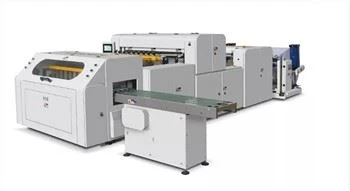 Paper Cutting A4 MachineThis machine suitable for Paper Roll to make A4 Paper Size Sheet etc.Add to Inquiry
 -
Roll To Sheet Cutting MachineThis machine suitable for Paper Roll to make A4 Paper Size Sheet etc.Add to Inquiry
-
A4 Size Paper Cutting MachineThis machine suitable for Paper Roll to make A4 Paper Size Sheet etc.Add to Inquiry
-
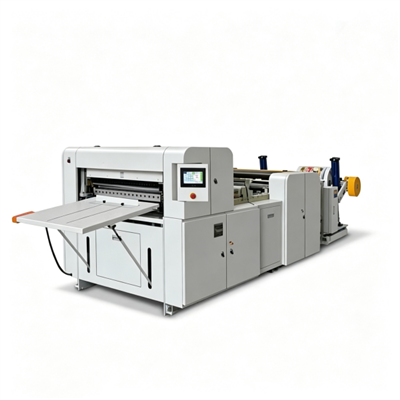 Automatic Roll To Sheet Cutting MachineThe machine is a customize size sheets cutting machine. It also be called roll to sheets cutting machine,paper sheeter machine,cutting slitting machine for cutting length sheets in the printing andAdd to Inquiry
 -
Roll To Sheet A4 Paper Cutting MachineThis machine suitable for Paper Roll to make A4 Paper Size Sheet etc.Add to Inquiry


- Mob: +8615167807851
- mingfengmachinery@163.com
- Add: Jielutou Industrial Zone, Ruian, Zhejiang, China
Sheeting is the process of cutting paper or other similar materials into specific lengths and widths. Sheeters can take large rolls and create smaller sheets of material for any needs. Sheeters can feed rolls of material or run in-line to convert the output of an extruder, calender, laminator or other web equipment.
Type of Paper Sheeting Machine
Manual Paper Cutting Machine The manual paper cutting machine serves as the most fundamental type, ideal for home offices or small companies. Primarily designed for cutting A4 paper, it is versatile enough to handle smaller items such as business cards and postcards. Consisting of a cutting knife and upper and lower cutting plates, the manual cutting machine employs a work arm for the cutting process. While it is compact, affordable, and easy to operate, its cut thickness is limited, typically processing only 1-2 sheets or 2-3 sheets of paper.
Electric Paper Cutting Machine Electric paper cutting machines, offering higher cutting efficiency, are suitable for medium and large companies, as well as publishing and printing institutions. These machines utilize an electric device to drive the knife for paper cutting, resulting in faster, more accurate, and convenient cutting. They excel at handling thicker paper without exerting excessive pressure, reducing operational difficulty and errors in the cutting process compared to manual alternatives.
Hydraulic Paper Cutting Machine In contrast to manual and electric counterparts, the hydraulic paper cutting machine employs pressure liquid to propel the cutting tool. This technology enables the stable cutting of multiple sheets of paper simultaneously. With heightened stability, accuracy, and speed, hydraulic paper cutting machines outperform the previous types.
What are advantages of Paper Sheeting Machine
High Efficiency
This device employs digital control technology, significantly enhancing work efficiency. It delivers precise cuts without manual intervention, ensuring stability and accuracy within the production line. Operating a fully automatic paper cutting machine is simple. Set parameters and click a button to execute cuts as required. Compared to traditional cutting equipment, fully automatic paper cutting machines handle large quantities of printing products swiftly, enhancing production efficiency and reducing the workload for corporate staff.


Greater Accuracy
Equipped with high-quality cutting tools and precise sensors, the fully automatic paper machine ensures accurate energy regulation and motion control through digital technology. This enhancement improves cutting precision and allows rapid adjustments as necessary. Its high accuracy enables the fully automatic paper machine to precisely cut various specifications in printing, whether it's length, width, thickness, or unique patterns and specifications. Using a fully automatic paper cutting machine reduces production error rates and enhances production quality.
Enhanced Stability
The automatic paper cutting machine integrates high-quality components and undergoes meticulous production processes, ensuring a stable overall structure less prone to failure. With superior production quality and reliable mechanical parts, the automatic paper cutting machine not only runs for extended periods but also reduces failure rates and downtime due to accidents during operation.

How to Maintain Paper Sheeting Machine
Regular Inspection and Cleaning Regularly inspecting and cleaning electrical appliance parts helps eliminate hidden dangers and ensures the smooth functioning of the machine.
High-Quality Blades for Slitting and Cross-Cutting The effectiveness of paper slitting and cross-cutting largely depends on the quality of the blades. Ensure the use of high-quality knives to achieve precise and clean cuts.
Daily Maintenance Practices Perform daily maintenance to keep the machine in optimal condition. Ensure it remains smooth, clean, dust-free, and free of debris. Pay special attention to the sliding parts to guarantee they are in good working order.
Regular and Irregular Inspections Conduct regular inspections on rotating parts: Regularly inspect rotating parts, with a focus on real-time monitoring of vulnerable components. Implement regular adjustments and timely replacements to prevent unexpected breakdowns and extend the equipment's service life.
Record Keeping and Commutator Care Keep meticulous records of commutators to track usage and performance. This practice contributes to extending the service life of the equipment.
Enhance Operator Skills and Training Invest in the technical training of personnel operating paper slitting machines. Assign dedicated personnel to control specific operations, and restrict unauthorized individuals from operating the machinery.
How does Paper Sheeting Machine Work
Most types of paper sheeting machines initiate their operations after loading the mother roll, also known as the jumbo roll. This substantial roll of material provides smaller paper pieces, such as A4 sizes.
In the unwinding section, the jumbo roll is initially placed for the unwinding process, leading to the subsequent slitting operation that produces various widths and lengths.
This section manages paper entry in preparation for slitting, following the loading of the jumbo roll. Notably, our paper sheeting machines are optimized for high-speed movement, allowing operation at significantly high speeds without compromising accuracy. The preferred cutting and slitting speed, however, depends on the chosen type of paper sheeter machine.
The machine's integration of the sheeting and slitting sections ensures a seamless flow of work, maintaining the quality of the resulting paper sheets. Once the paper is cut into the desired widths, it proceeds to the sheeting section.
This section is where the paper roll is cut into various sizes. Configurations can be adjusted to achieve different paper size widths and lengths, such as A4 and A3 for most paper sheeter machines. Depending on preferences, the integration of processes like flexographic printing can be incorporated into this section by linking the paper sheeting machine with a compatible printer.
Centralized within the machine, the control section facilitates the ease of managing various aspects of the machine. The control monitor displays parameters and enables adjustments based on the current operations.

How to Achieve Accurate Cutting With a Paper Sheeting Machine
The size must be right
The first step in accurate cutting is to make sure two important factors on the commercial paper cutter are set correctly:
Measurement display
All paper cutting machines have a system for displaying the position of the backgauge. Older machines have a ruler while newer ones have a computer display. The first step in avoiding cutting problems is to ensure that the display shows the correct position of the backgauge. The ability to recalibrate is a feature found on a number of industrial paper cutters and is a standard setup on retrofit computers. Checking for size is very simple: The backgauge is set to a displayed size and a sheet is cut. The cut sheet is measured and the actual size is compared to the displayed size. If there is a difference, an adjustment must be made based on each manufacturer's procedure.
Squareness of the backgauge
The squareness of a guillotine paper cutter's backgauge (parallel to the knife) is critical to proper cutting. While each manufacturer has a different procedure for adjusting the backgauge, a very simple test can be used for checking squareness of the backgauge: A small, narrow pile is cut on both sides of the machine at the same time. The two piles are compared and if there is a difference in the size of the two piles, the backgauge is not square.
Get rid of parallelograms, and square the sheets
Sheets of paper and other materials that need to be cut are not always rectangles with 90° corners. In many cases, they are parallelograms (4 sided objects where the corners are not 90°). This causes a big issue when trying to align sheets into the square corner of a paper cutter formed by the side gauge and backgauge. The pile will not properly align in relationship to the knife, and the sheets will continue to be parallelograms. This can have a disastrous effect when running sheets through a press or a folder, or through any machine where you rely on the edges of the sheet to align properly.
The solution is to square the sheets on the paper cutter. This is accomplished on a heavy duty paper cutter simply by not trying to force the un-square corners of the sheet into the square corners on the paper cutting machine. The lift should first be aligned against the backgauge only (with printed sheets, the gripper edge should be placed against the backgauge).
When the lift is then cut, the "front edge" and the "rear edge" (against the backgauge) will then be parallel. The lift is then turned ninety degrees and one of the parallel edges is placed against the side gauge only and pushed back to barely rest against the backgauge. When the lift is cut, the result will then be a good 90° corner. This lift can now be turned and placed into the corner of the backgauge and the side guide to cut the last two edges.
Register: internal and external
When cutting printed sheets, the register factor comes into play in two forms: internal and external.
Internal register is the position of the images relative to each other.
External register is the position of the images relative to the sheet itself.
Internal register is the primary concern of the pre-press and press areas. Once sheets are printed, it can't be adjusted. External register, while considered for pre-press in layout and on press when printing the sheet, becomes the primary concern of the cutting and finishing departments. While we can't adjust the images for register, we can control their relative position in regard to the edges of the sheet. Paper can change size when printed and the decision may need to be made to cut to the image or cut to size.
This is why it's important for the cutter operator to receive complete information and a rule out with each job. When setting up the cutter, a small lift or even a single sheet should be cut to check that everything works out correctly.
While today more and more is being done electronically, it is important to remember that paper is not a stable substrate. Under the effects of moisture, heat and pressure (all found on printing presses), paper size will change. Manufactures have offered off-line programming for a number of years but adjustments may still need to be made to paper during cutting. In complex cutting programs, adjustments may need to be made at various points to compensate for changes in the sheet.
Make sure the knife is sharp
One of the major causes of problems with a paper cutter is the use of a dull or blunt knife. Besides the inaccuracy of the cuts, the machine will be subject to unnecessary strain.
Signs that a paper cutter knife is blunt are:
A rough or a speck-y smooth cutting edge, depending on the material.
A bang is heard when cutting the bottom sheets of a pile.
The cut material sticks together.
The cut edge of the material is ridge-like or turned down
Inaccuracies in cutting (overcut, undercut, etc.)
Regular paper cutter blade sharpening is key to productivity and longevity of the machine.
Clamp pressure is the critical setting
To obtain maximum productivity on a paper cutter, we try to stack piles as high as possible. With the stacking of material, setting the clamp pressure becomes critical. The basic rule of thumb is to use higher clamping pressure for soft material and lighter pressure for hard material.
The clamp pressure selected should not be higher than necessary to avoid dislocation or dragging of sheets.
Lists of recommended pressure settings for different material are available from a number of paper cutter manufactures. These guidelines for clamp pressure settings, along with proper knife angle, become critical with working with different materials.
Identify Your Needs
Establish your specific cutting requirements. Consider the types of materials you'll be cutting, the sizes of paper or materials you will use, and the volume of cutting you want to accomplish. Paper cutters are designed for cutting paper, but some models can cut through cardboard, laminated sheets, labels, and photographs. Most paper cutters can accommodate letter size paper (8.5" x 11"), which is the standard paper size for documents and printing, and legal size paper (8.5" x 14"), which is used for legal documents. Determine if you are doing low volume, medium volume, or high volume cutting.
Cutting Capacity
Cutting capacity is the maximum number of sheets a paper cutting machine can cut at one time. Choose a paper cutter that can facilitate your typical workload without damaging the machine, or giving up the quality of cutting you want. Manual paper cutters have a cutting capacity of about 10 to 50 sheets of standard sized paper per pass. Semi-automatic paper cutters have a cutting capacity of about 100 to 300 sheets of standard sized paper per pass. On the other hand, automatic paper cutters have a cutting capacity of 200 to 1,000 or more sheets of standard sized paper per pass.
Cutting Width
The cutting width is the maximum width of paper or materials the paper cutter can cut. The cutting widths of paper cutters vary based on the specific type of machine, its intended use, and the manufacturer's design. Make sure that the cutting width of the paper cutter you plan to buy is a good fit for the work you plan to do.
Type of Cutter
Evaluate whether you need a manual, semi-automatic, or automatic paper cutter based on your workload and desired level of automation. Manual paper cutters require the user to physically operate the cutting mechanism by hand. This could involve pulling a lever or handle to bring down the cutting blade onto the paper. Semi-automatic paper cutters combine manual operation with motorized cutting. They are controlled by a foot pedal or button. Automatic paper cutters operate fully automatic with motorized cutting, and usually have a control panel that allows the user to set cutting parameters.
Safety Features
Paper cutters have sharp blades, so it is important to research safety features such as blade guards, safety locks, and shields that prevent accidentally activating the cutting blade. A blade guard on a paper cutter protects users from the sharp cutting blade when their machines are not being used, or during operation. A safety lock on a paper cutter protects users when they are setting up their paper cutters, during maintenance, or when their machines are not in use. Shields on a paper cutter cover the cutting blade and provide an extra layer of safety.
Accuracy and Precision
Take a look at reviews of paper cutters and their specifications to understand the accuracy and precision of each paper cutters' cutting results. Check for features such as measurement guides and alignment aids. These features could consist of rulers, scales, grids, and other markings on the cutting surface of paper cutters. They help users accurately position and align their paper for cutting.
Durability and Build Quality
Consider the durability and quality of paper cutting machines. They can be made out of steel, cast aluminum, and cast iron. Paper cutters with sturdy construction tend to last longer and perform better over time. The devices range from basic, lightweight models built for occasional use to heavy-duty commercial machines that are constructed for high-volume cutting.
Replacement Parts
Check to see if the paper cutter you want to buy has replaceable components like cutting sticks and blades. A cutting stick is a rectangular bar made of durable plastic material. It is put on the bed of a paper cutter, parallel to the cutting blade's edge. When the user makes a cut, the blade presses into the cutting stick, creating a groove. The groove prevents the blade from dulling too quickly, and ensures that it has a controlled and accurate cutting path. This reduces wear on the blade's edge and minimizes the impact on the blade's sharpness. When the groove becomes too deep, the user has to replace the cutting stick to maintain the quality of cuts. Also, many paper cutting machines are made with replaceable cutting blades so a dull blade is replaced with a new blade when the old one is ineffective.
Ease of Use
Find a paper cutter with an intuitive interface and user-friendly controls. There are models that have digital displays and programmable settings for more efficient operation. A digital display on a paper cutter is a visual interface that gives users real-time information and feedback about the cutting process. It can show precise measurements, and may include measurements in inches, centimeters, or both. Programmable settings allow users to program and save specific cutting settings for different materials or cutting jobs. These settings can be recalled for future use.
How to Solve the Most Complex Issues of Paper Sheeting Machine
Poor-Performing Blades
The blades built into paper cutters are mostly responsible for how well they work. For precise cuts, they must always be razor-sharp. Modern Paper Cutting Machine include self-sharpening blades that require less upkeep. Normal blades do, however, have a finite lifespan, and if they are not used for an extended period of time, they begin to shred the paper rather than cut it.
Purchase automatic paper cutters with self-sharpening blade sets instead to avoid this inefficiency. You should swap out the blade in a typical paper cutter every 48 hours of cutting. This limit can be identified by the cut counter present in modern paper cutters of all varieties.
Lack of proper maintenance for the Unit
If a machine is misused roughly and neglected frequently, it will eventually stop functioning. According to experts, the unit's ability to operate efficiently depends on routine cleaning. In order for the paper cutter to effortlessly cut the sheets, users must keep its components lubricated. Whether you use tabletop cutters or another type, make sure the installation location is clean and tidy to prevent the environment from damaging the machine's internal components.
Unsafe machine operations
Inadequate user care and a lack of safety precautions when using semi automatic Paper Sheeting Machine frequently result in workplace accidents that negatively impact the users in several ways.
Inexperience of the Users
The automatic paper cutters of today encourage even beginners to start using the tool without much training, in contrast to earlier times when only specialists used paper cutters. It might be viewed as both a benefit and a drawback of paper cutters. An unskilled user is more likely to use the paper cutter carelessly, just using it to temporarily satisfy their cutting needs. Users—beginners or experts—should receive sufficient training before using the machine in order to prevent the negative impacts of such inexperienced behaviors. They should be knowledgeable about the appropriate cutting techniques, clamping pressure, and angles for feeding the paper that are appropriate for each type of paper being cut.
What are the Safety Features to Look For When Buying a Paper Sheeting Machine?
Blade Guard
The blade guard is, by far, the most important safety feature available on guillotine cutters. Surprisingly, many people remove the safety guard when they use the cutter. While the guard may be a little obtrusive, working without fingers is far more troublesome. Sometimes the blade guard is a metal bar positioned close to blade, but superior blade guards are made of plastic and will prevent users from getting their fingers near the blade on either side of the machine.
Blade Latch
The blade latch locks the blade down when you are not using the cutter. It is usually a small wire that simply hooks over the handle. Sometimes it's a piece of metal connected to the bottom of the handle. The purpose of the blade latch is to keep the blade down so that no one accidentally or impulsively grabs, strokes, or touches the blade. Obviously any of these could result in a serious and potentially life-altering injury that could have been prevented by simply exercising some caution and common sense.
Tension Spring
All guillotine type units should be equipped with tension springs. The tension spring is attached to the back of the blade and is engineered to prevent the blade from rushing down when the handle is released. Guillotine cutters without this spring live up to their name, guillotine, and are very, very dangerous. You should never operate a paper cutter that has no tension spring. It is literally an accident waiting to happen. No paper cutting task is worth losing a digit over. If your cutter has no tension spring, put it in a safe and secure location until the tension spring can be replaced.
The biggest single factor in guillotine paper cutter safety is the user. There is simply no substitute for good common sense. Do not use one when you are distracted or when you cannot give your full attention to the task at hand. Even units with safety features can still cause accidents. These types of machines are wonderful tools because of their powerful blades and ability to easily cut through piles of paper. However, for the very same reasons it is a good tool, it is a dangerous one. Always exercise caution when using one of these machines and do not use one that isn't equipped with safety features.
How to use Paper Sheeting Machine


Read the Manual
Start by thoroughly reading the user manual provided by the manufacturer. The manual contains specific operational instructions, safety guidelines, and detailed procedures crucial for proper usage.
Setup and Inspection
Ensure that the paper sheeting machine is set up on a stable surface, and verify that all components are correctly assembled. Conduct a comprehensive inspection to identify any signs of damage or wear.
Power On
Connect the machine to the power source following the specifications outlined in the manual. Power on the machine and wait for it to complete the initialization process.
Material Loading
Load the roll of paper that needs to be sheeted onto the machine. Follow the manufacturer's guidelines for proper loading onto the unwind stand or feeding mechanism.
Web Alignment
If the machine features a web guiding system, ensure that the paper web is aligned correctly. Utilize any adjustment mechanisms provided to maintain straight paper feed throughout the machine.
Adjust Settings
Set the machine parameters according to the desired sheet size, cutting length, and other specifications. This may involve adjusting cutting blades, feed rollers, and other control mechanisms.
Safety Precautions
Verify that all safety features are functioning correctly, including emergency stop buttons, safety guards, and other mechanisms designed to prevent accidents.
Start the Machine
Initiate the machine's operation according to the manufacturer's instructions. Monitor the machine during startup to ensure proper paper feed and cutting.
Quality Checks
Once the machine is running smoothly, perform quality checks on the cut sheets. Confirm that the sheets meet the correct size specifications and that the cutting is clean and precise.
Adjustments as Needed
If necessary, make adjustments to machine settings to improve cutting accuracy or address any issues identified during initial operation.
Unload Cut Sheets
After sheeting is complete, carefully unload the cut sheets from the machine. Utilize any provided stacking or collecting mechanisms to gather the sheets.
Shutdown
After completing the sheeting process, follow the proper shutdown procedure outlined in the manual. This may involve turning off the machine, securing components, and cleaning if necessary.
Maintenance
Establish a regular maintenance schedule for the paper sheeting machine. Tasks may include blade sharpening, lubrication, and overall equipment inspection.
Our Factory

Frequently Asked Questions
Q: What is the primary function of a paper sheeting machine?
Q: How does a paper sheeting machine handle different paper sizes?
Q: What industries typically use paper sheeting machines?
Q: Can paper sheeting machines handle materials other than paper?
Q: What are the key components of a paper sheeting machine?
Q: What is the typical lifespan of a paper sheeting machine
Q: How does the slitting process work in a paper sheeting machine?
Q: What maintenance is required for paper sheeting machines?
Q: What safety measures should operators follow when using paper sheeting machines?
Q: How efficient are paper sheeting machines in terms of production output?
Q: Can paper sheeting machines be integrated with other equipment in a production line?
Q: What is the difference between manual, electric, and hydraulic paper cutting machines?
Q: Are paper sheeting machines user-friendly for operators with varying skill levels?
Q: How can one ensure the longevity of a paper sheeting machine?
Q: Can paper sheeting machines handle specialized cutting requirements?
Q: Are paper sheeting machines environmentally friendly?
Q: Can paper sheeting machines handle high-density or thicker materials?
Q: What technical support and service are available for paper sheeting machines?
Q: How customizable are paper sheeting machines to specific industry needs?
As one of the most professional paper sheeting machine manufacturers and suppliers in China, we're featured by the newest machinery with low price. Please rest assured to wholesale discount paper sheeting machine in stock here from our factory. Contact us for more information about easy-maintainable machinery.
paper guillotine large, zig zag paper cutting machine, circle paper cutter machine